Geographic Targeting (Country, State, City, Zip, DMA)
In the Campaign Manager, in the Ad Group level, the Blockboard platform provides targeting tools for Geographic Targeting. Geolocation targeting allows users to
In the Campaign Manager, in the Ad Group level, the Blockboard platform provides targeting tools for Geographic Targeting. Geolocation targeting allows users to target by Country, State, City, Zip Code, and DMA.
NoteGeolocation and Geofencing targeting is not available simultaneously.
- 1Navigate to the Campaign Manager on the left panel
- 2Navigate to the Ad Group, by either creating a new Ad Group or editing an Ad Group that's already created
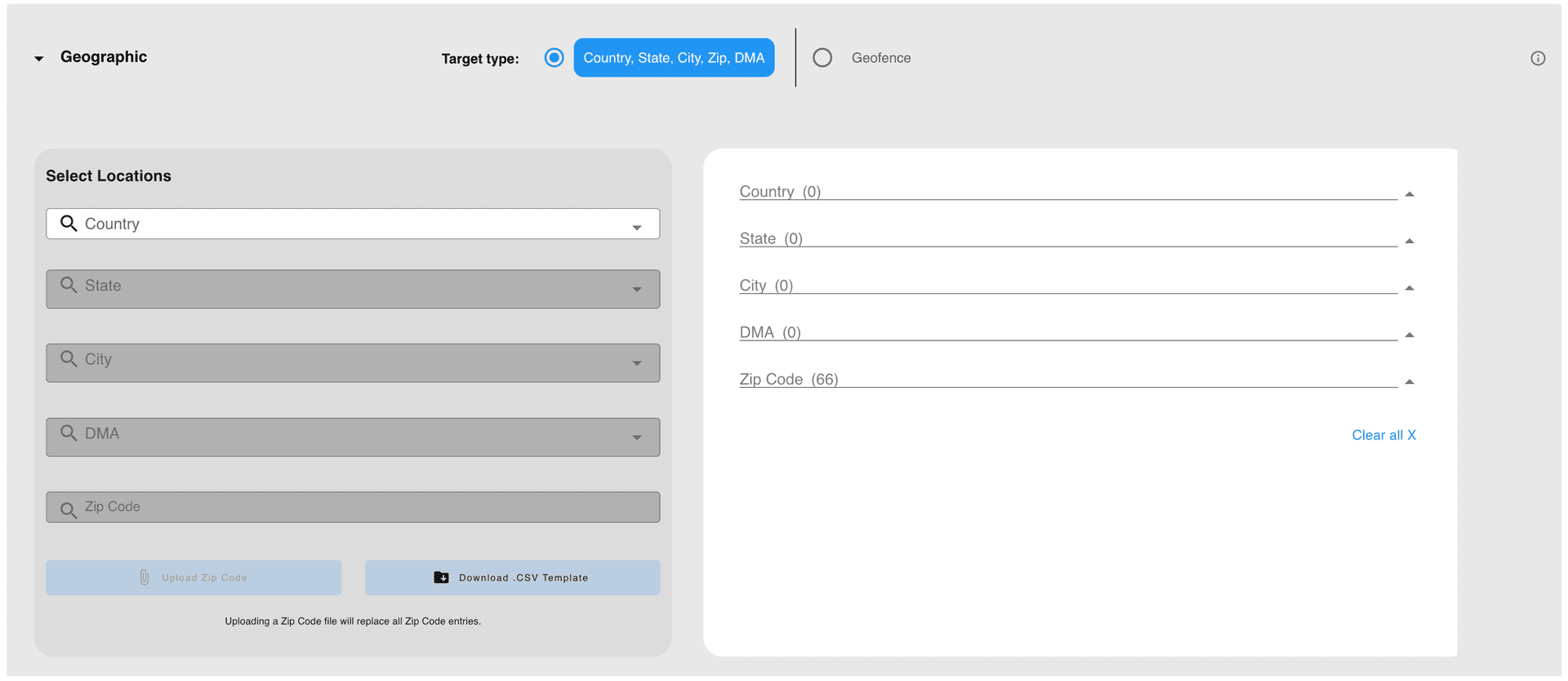
- 3Under the Targeting section, under the Geographic section, make sure Country, State, City, Zip Code, DMA is selected
- 4Choose a country to begin. Note: Currently, Blockboard only allows for targeting in the United States
- 5Then, choose to search and select from States, Cities, Zip Codes, or DMA areas
- 6After selecting, your choice will appear on the right side
- 7You can choose to exclude this choice from targeting, by checking the exclude box
- 8To cancel a selection, click the X on the pill, or remove all
- 9To import a list of Zip Codes, click the import button and upload your file Note: You can see an example of proper formatting by first downloading a Zip Code template file

Ready to Transform Your Advertising?
Built for performance marketers, BlockVantage steers every step of your programmatic workflow — from launch to optimization — in just a few clicks.
Get Started Free